


Dominoes: Classic Dominos Game
4.7781.00 Reviews
App Specs
- Version
- 1.7.3.1744
- Updated On
- License
- Free
- Downloads
- 1,000,000+
- Developer
- MobilityWare
- Categories
- Board
- Platform
- Android, iOS
Screenshots



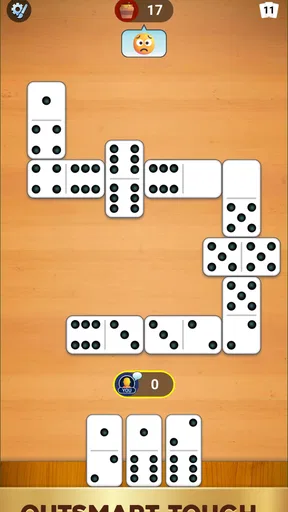




 Analysis by AppCompare
I judge a domino game less by how many extras it can advertise than by whether it makes a quiet stretch of free time feel worthwhile. Dominoes: Classic Dominos Game is a board game from MobilityWare, and its appeal is easy to understand: familiar tiles, a choice of ways to play, and the option of facing another person online. I’d consider it for a short break or a casual match, though the details that matter most to a competitive player—such as how online opponents are selected and how purchases affect play—deserve a closer look before you settle in.
Who will get the most from a tile game?
This is a natural fit if you already know dominoes and want a convenient way to play without setting up a physical set. It can also suit a beginner who is willing to learn by playing, especially when a rules guide is available. The app is free to download, carries an Everyone age rating, and has an average rating of 4.6 from around 20,000 ratings. Those figures give a useful sense of its broad appeal, but they don’t tell you whether its particular pace and modes will suit your taste.
I’d be more cautious about recommending it to someone who wants a fully verified, tournament-style experience or needs precise information about matchmaking and paid advantages before joining online games. A physical set is still the better choice for a group around one table; a social video call may work better when conversation matters more than quick turns. This app’s strongest use case is the in-between option: a solo practice session or a match with someone who is also happy to play on a phone.
What a short session can look like
Imagine having ten minutes free while waiting for an appointment. A quick game against the AI gives that time a clear shape: check the open ends, decide which tile helps you now, and avoid playing only by instinct. If you have a longer break, trying a different rule set can make the same tile pool feel like a different puzzle. That change of rhythm is more useful than an elaborate progression system would be for someone who simply wants a compact game.
For a more deliberate session, I’d treat each turn as a small information problem. Keep track of which numbers are appearing, notice when an opponent hesitates or has limited legal options, and avoid assuming that a convenient move is automatically the best one. These habits are useful in any domino game, but the app’s ability to start a match quickly makes it practical to focus on one skill at a time rather than waiting to gather a table of players.
Playing, learning, and deciding whether to spend
I’d use this section to weigh the practical starting point—free to download, with optional purchases listed from $4.99 to $24.99 per item—against what you actually want from a domino session. I’d begin without buying anything, learn how the modes feel, and check each item’s description before deciding whether it adds value for me; that leads naturally to the question of how progress and competitive pressure shape play.
First Impressions: A Classic Look with a Modern Twist
The first thing that strikes you about Dominoes: Classic Dominos Game is its clean and simple interface. It’s like the developers decided to keep things classic but added a dash of modern flair. The game’s layout is intuitive, ensuring that even if you’re new to the game, you won’t feel lost. The domino tiles are easy to read, and the graphics are sharp without being over-the-top. This simplicity keeps the focus on the gameplay, which is exactly what you want from a classic game.
Worth Reading Before You Choose

EA SPORTS FC Mobile 26 Is a Bigger Football Game, but It Takes Time

Flipboard Shows What News Apps Must Do Beyond the Feed

Switching to Android Auto Means Rethinking Your Driving Routine

Google Calendar Makes a Crowded Week Easier to Manage

Ludo King Makes the Most of the Minutes Between Plans

Baby Panda World Brings Quick Play to Modern Phones, but Its Game Library Feels Busy
Gameplay: Easy to Pick Up, Hard to Put Down
Now, let’s dive into the gameplay. The app offers several modes, including Block, Draw, and All Fives, so you can switch things up depending on your mood. Each mode comes with its own set of rules, but don’t worry if you’re not familiar with them. The app provides a handy guide to get you started.
What really makes this game stand out is how engaging it is. You can play against the AI, which is surprisingly challenging, or take on your friends in multiplayer mode. Trust me, there’s nothing like the satisfaction of outsmarting your opponent with the perfect move. Plus, the app tracks your stats, so you can see how you stack up against the competition.
Choosing a mode and finding your rhythm
For a newcomer, I’d start with whichever mode has rules that sound most familiar, then use the in-game guide before switching. That small pause can prevent a common frustration: making a move that seems sensible under one version of dominoes but scores or behaves differently under another. Once the basics click, rotating among Block, Draw, and All Fives is a practical way to keep sessions varied without having to learn a completely different board game.
There is also a useful distinction between practicing a move and testing it against a person. The AI is convenient when you want to play immediately or repeat a situation without coordinating schedules. Friends or random opponents add uncertainty, which is where reading the game becomes more demanding. I would use solo play to get comfortable with a mode, then switch to multiplayer when I want the extra pressure of an opponent whose choices I can’t predict.
Features: More Than Just a Game
While the core of the app is all about playing dominoes, there are a few extra features that add to the experience. For instance, you can customize the game’s appearance by choosing different themes and tile designs. It’s a small touch, but it makes the game feel personal.
Another nifty feature is the daily challenges. It’s a great way to keep things fresh and test your skills. Completing challenges earns you rewards, which you can use to unlock even more customization options. It’s like a little incentive to keep coming back, not that you’ll need it once you’re hooked.
How progress changes the feel of play
Stats and daily challenges can provide a reason to return, but I would treat them as light structure rather than proof of skill. A win-loss record can reflect who you happened to face, which mode you played, and whether you were experimenting with unfamiliar rules. If you want to improve, focus on a specific habit—such as remembering exposed numbers—rather than chasing a record across different kinds of games.
The customization rewards also create a modest trade-off. Themes and tile designs can make a familiar board feel more like your own, yet cosmetic unlocks are not a substitute for deeper strategic options. If you mostly want dominoes for its decisions, you can ignore that layer and concentrate on matches. If collecting small rewards is part of the fun for you, the challenges offer a reason to revisit the app even when you are not in the mood for a longer game.
Multiplayer Madness: Challenge Your Friends
If you’re like me and enjoy a bit of friendly competition, the multiplayer mode is where this app really shines. You can invite friends or get matched with random players from around the world. It’s a great way to test your skills and learn new strategies. Plus, the chat feature lets you communicate with your opponents, adding a social element to the game.
The multiplayer mode runs smoothly, with minimal lag, which is crucial for a game that relies on strategy and timing. It’s exciting to see the global leaderboard and know that you’re competing against players from all corners of the globe.
Competition, fairness, and practical limits
Online play is most enjoyable when I treat each match as a casual contest, not as a formal ranking test. Playing friends gives you a familiar social context; matching with strangers brings variety but also means you may encounter different experience levels and styles. The leaderboard can be motivating, though I wouldn’t use it alone to judge whether I am improving. Reviewing the decisions that left me with awkward tiles is more actionable than simply comparing totals.
For fairness, the key distinction is between what the game lets you do and what a player can verify from the outside. The available purchase information shows in-app items priced from $4.99 to $24.99 per item, but it does not establish whether any purchase changes competitive balance, affects matchmaking, or is limited to appearance. I would not assume either an advantage or a purely cosmetic shop without checking the purchase descriptions in the app. If you prefer competition where every advantage and rule is clearly documented, a face-to-face game with agreed rules may be a better fit.
Usability: Smooth Sailing All the Way
One of the things I appreciate about this app is how user-friendly it is. The controls are simple, and the game runs smoothly without any hiccups. Whether you’re playing on a smartphone or a tablet, the experience is seamless. The developers have done a fantastic job optimizing the app for different devices, ensuring that everyone has a smooth gaming experience.
Another aspect worth mentioning is the lack of intrusive ads. Sure, there are ads, but they’re not overwhelming or disruptive. This allows you to focus on enjoying the game rather than being interrupted every few minutes.
Before installing: cost, device, and expectations
The game is free, with optional in-app purchases in the listed range, so I’d begin without spending and decide later whether any offered item is worth it to me. The current version is 1.7.0.1719, and it requires Android 8.0 or later. It has more than one million installs, which suggests a substantial audience for online play, though install totals cannot promise that a particular friend will be available or that every match will feel evenly balanced.
If you are choosing between this and a simple offline domino app, the deciding question is whether you value online opponents, tracked stats, challenges, and cosmetic choices. Those extras give this game more to revisit, while a stripped-back alternative may be preferable if you want fewer prompts and no interest in progression or online competition. Someone who needs dependable play without internet should check the app’s current behavior before relying on it for travel or a commute; I would not plan around offline access unless I had tested it first.
What I would check in everyday use
Before a longer session, I’d look at the selected mode and make sure its rules match what I expect. That is especially worthwhile when moving between All Fives and a mode focused on emptying tiles, because a scoring assumption carried over from one can lead to confusing decisions in another. I’d also try a short AI match first if I had changed a setting or returned after a break; it is a low-pressure way to reacquaint myself with the board before playing someone else.
For a shared session, inviting a friend is the more predictable choice if the point is conversation and a rematch. Random matchmaking is better when no one you know is free, but it is less suited to a planned social evening. And if a match becomes less enjoyable because chat or competition feels distracting, choosing solo play is a reasonable way to keep the game’s tile strategy without the social layer.
Final Thoughts: A Must-Have for Domino Lovers
All in all, Dominoes: Classic Dominos Game is a delightful app for anyone who loves a good game of dominoes. Its simplicity, combined with a range of features and multiplayer options, makes it a standout choice in the world of mobile gaming. Whether you’re looking to unwind after a long day or engage in some competitive play, this app has got you covered. So, why not give it a try? You might just find yourself becoming a dominoes aficionado in no time!
My recommendation is more measured than “must-have”: I would try it if I wanted several familiar rule sets, a quick solo opponent, and the chance to play other people from my phone. The strongest reasons to pass are equally straightforward: you prefer a physical table, want a tightly documented competitive environment, or are looking for a game with no purchase prompts or progression hooks. MobilityWare’s domino game has enough variety to support both brief practice and friendly rivalry, but the purchase details and online conditions are worth checking for yourself if fairness is a priority.
Pros
- Simple and intuitive controls.
- Variety of game modes available.
- Smooth
- lag-free performance.
- Visually appealing graphics.
- Offline play supported.
Cons
- Limited customization options.
- Advertisements can be intrusive.
- No multiplayer chat feature.
- Lacks advanced tutorials.
- In-app purchases can be pricey.
FAQs for Dominoes: Classic Dominos Game
What are the main features of Dominoes: Classic Dominos Game?
Dominoes: Classic Dominos Game offers a traditional gaming experience with modern enhancements. It includes several modes like Draw, Block, and All Fives, catering to both casual players and enthusiasts. The app provides customizable themes, intuitive controls, and a user-friendly interface, making it easy to enjoy the classic game on your device.
Is Dominoes: Classic Dominos Game free to play?
Yes, Dominoes: Classic Dominos Game is free to download and play. However, it may include in-app purchases that offer additional features or remove ads. While these purchases can enhance your experience, they are completely optional and the core game remains accessible without spending money.
Does Dominoes: Classic Dominos Game require an internet connection?
No, you can enjoy Dominoes: Classic Dominos Game offline. The game offers single-player modes against AI opponents, so you don't need an internet connection to play. However, if you wish to participate in online multiplayer matches, an internet connection will be necessary.
Can I play Dominoes: Classic Dominos Game with friends?
Yes, the app supports multiplayer modes that allow you to play with friends. You can invite friends to join a private game or compete against other players online. This feature enhances the social aspect of the game, making it more engaging and interactive.
What devices are compatible with Dominoes: Classic Dominos Game?
Dominoes: Classic Dominos Game is available for both Android and iOS devices. It supports a wide range of smartphones and tablets, ensuring a smooth gaming experience. To ensure compatibility, check the app's requirements on the Google Play Store or Apple App Store before downloading.


